Test release: first 30 days free

Get your client’s criteria before the first meeting.

ARIA runs the intake with each new lead. Your client opens a link and answers questions for about 15 minutes. After the client consents, the agent receives a meeting memo with budget, areas, and must-haves.

Register a credit card to use ARIA free for 30 days.
From day 31, $99 per user per month is charged automatically.

What happens today

Every agent asks clients different questions.

Here are four problems sales teams often run into between the first inquiry and closing.

New lead

You learn nothing new until the client picks up the phone

Clients who can’t talk during weekday business hours get their first conversation late. Meanwhile, another brokerage may move ahead with them.

First meeting

What gets asked, and how deeply, depends on the agent

Newer agents ask about budget and area, then end the meeting. The mismatch shows up at the showing.

After showings

Only the agent knows how the client’s wants have changed

Showing feedback stays in text threads and notebooks. A manager who wants the status has to ask the agent.

Offer to closing

Agents notice client concerns too late

Between loan approval and closing, some clients put the purchase on hold without telling the agent what worries them.

How it works

Here is how the agent’s work changes at each stage of a deal.

We recorded each of the four stages on the actual screens. Click a label under a video to play from that point.

1New lead

Send an invite link, and the intake starts.

Enter the client’s name and language to create an invite link. You can also add the URL of the listing they asked about. Send the link by email, or copy it into the channel you already use. Clients answer when it suits them, in Japanese, English, or Chinese.

Today
Call the client, and wait for a callback if they don’t answer
ARIA
The intake starts as soon as you send the link
Actual screens (fictional demo data)About 13 sec
Enter the name, language, and the URL of the listing they asked about to create an invite link.

Screens shown in Japanese. English screens coming soon.
2First meeting

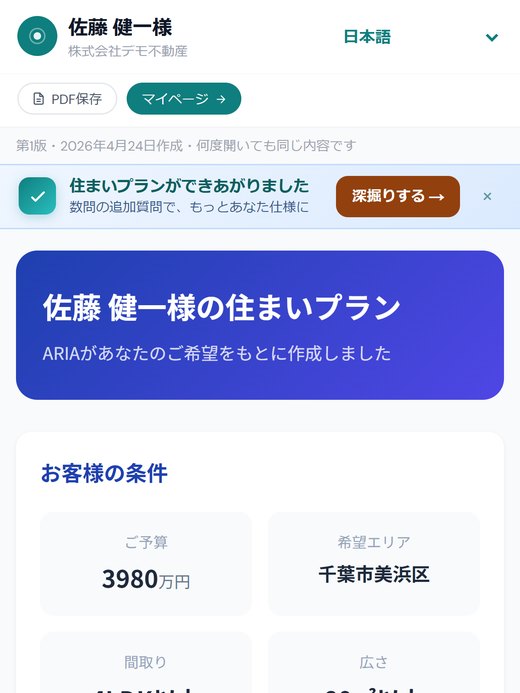
Criteria and home search plans are ready before the meeting.

ARIA sorts the answers into must-haves and negotiables. ARIA also builds a home search plan for each area, in HTML and PDF. Each plan includes a map and nearby amenities.

Today
Spend the first half of the meeting asking about budget and areas
ARIA
Spend the meeting proposing homes and answering the client’s questions
Actual screens (fictional demo data)About 20 sec
The “where criteria can flex” view on the agent’s screen, and the client’s home search plan.

Screens shown in Japanese. English screens coming soon.
3After showings

Update the client’s criteria from showing feedback.

Clients can send showing feedback to ARIA from their client portal. The feedback goes to the agent’s screen. Once the agent approves, the criteria update and ARIA adds an addendum to the home search plan.

Today
The agent gets feedback by phone and logs it in a notebook or text thread
ARIA
The reason the criteria changed stays in the deal record, in the client’s own answers
Actual screens (fictional demo data)About 20 sec
The client sends showing feedback to ARIA in the client portal, and it reaches the agent’s screen.

Screens shown in Japanese. English screens coming soon.

4Offer to closing

Use the dashboard to find deals that are slowing down.

ARIA shows the tasks for each stage, from offer to closing. The dashboard lists today’s tasks and clients you haven’t heard from in a while. Open a deal to see how far the client and the agent have each gotten with their prep.

Today
Each stage’s follow-ups depend on the agent’s memory and calendar
ARIA
Today’s follow-ups and clients who stopped responding appear in one list
Actual screens (fictional demo data)About 18 sec
Check today’s tasks and the clients who need follow-up on the dashboard, then open a deal’s prep status.

Screens shown in Japanese. English screens coming soon.

What clients get

After the intake, clients keep receiving material to help them decide.

ARIA also prepares the screens clients view on their phones. The agent reviews the content, sends it, and updates it as the deal moves forward. The home search plan and client portal shown here are actual screens.

Screens shown in Japanese. English screens coming soon.

Home search plan

Clients compare daily life after the move, area by area

ARIA builds a home search plan for each area from the client’s answers. Each plan shows commute times to work or school and nearby amenities, with a map. Clients open it on their phone and review it with their household. If their wants change after a showing, ARIA adds an addendum.

Market updates

Stay in touch with clients who plan to buy later

ARIA provides email drafts for market updates and check-ins. The agent edits each one before sending. ARIA never sends them on its own.

Screens shown in Japanese. English screens coming soon.

Client portal

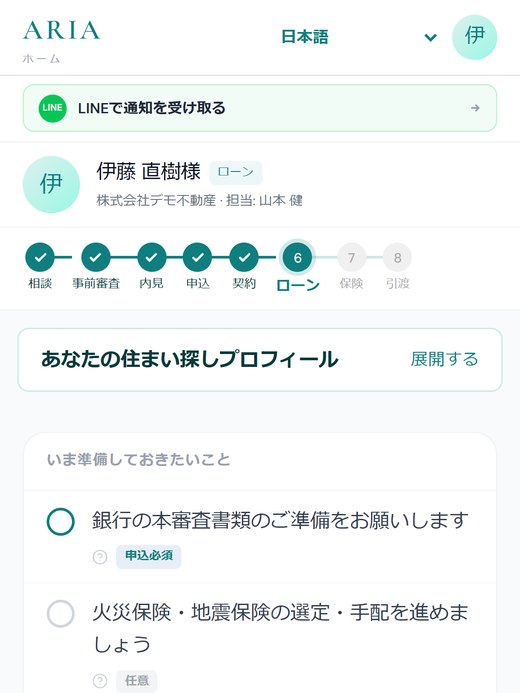
From loan approval to closing, clients know what to do next

The client portal shows transaction progress and what the client needs to provide, such as required documents. For purchases, it also shows the pre-approval, mortgage, and insurance stages. The agent manages the tasks for the same stages.

For team leads and operations managers

Used across a team, ARIA gives every agent the same intake standard.

New and experienced agents start the intake the same way.

Same intake flow, whichever agent has the client

ARIA runs every intake with the same question flow, so the topics covered don’t depend on the agent’s experience. New agents go into their first meeting with the same information as everyone else.

Every deal keeps its history

Client answers, showing feedback, and task history are recorded for each deal. If the agent changes, the next agent can check the history in the record.

Data is stored separately for each company

Client data is stored in a database separated by company. Files can only be viewed through signed URLs that expire.

You pay only for people who use the dashboard

Each agent, manager, and owner takes one seat. Clients are not counted.

Actual screens (fictional demo data)About 18 sec
Each deal shows how far the client and the agent have each gotten with their prep.

Screens shown in Japanese. English screens coming soon.

ARIA from the client’s side

Clients just open the link they receive.

No app to install

Clients set a password from the link in the invite email, and the questions start right away. They can answer whenever it suits them.

Shared only after the client consents

Intake answers are shared with the agent only after the client selects “I agree.”

Japanese, English, and Chinese

Choose the language for each deal. Clients who would rather not type can answer by voice.

Agent-only summaries stay off the client’s screen

The summary of must-haves and negotiables appears only on the agent’s screen.

What ARIA does not do

ARIA does not deliver legally required disclosures, sign contracts, or give legal, tax, or mortgage advice. Licensed agents and your team handle those. ARIA handles the intake, records, and client communication around them.

Pricing

$99 per user per month. The first 30 days are free.

This is a test price. All features are available during the test period.

Test release price
$99/ user / month, plus applicable tax
  • Free for 30 days when you register a credit card
  • From day 31, the monthly fee is charged automatically
  • Cancel during the free trial and you won’t be charged
  • Clients (the people who complete the intake) are not counted
Start 30-day free trial
8 users
First 30 days$0
From day 31 (monthly)$792

Managers and owners count as users if they use the dashboard.

FAQ

Questions teams ask before signing up

Will clients mind answering ARIA’s questions?

Clients receive the link as an invitation from their agent. Answering takes about 15 minutes, at any time and from anywhere. Clients who are hard to reach by phone get a way to answer when it suits them. Answers are shared with the agent only after the client consents.

Can I start right after signing up?

Yes. Enter your company name, your name, and your email address, and you’ll receive an email to set your password. After you log in and register a credit card, you can create a deal and invite a client right away.

What happens when the free trial ends?

From day 31, $99 per user per month is charged automatically to your registered credit card. Cancel during the free trial and you won’t be charged.

Can we customize the questions for our company?

ARIA provides the question flow for each market (Japan and the US). If there are topics your company wants covered, contact us.

Do the client’s criteria update after showings?

Clients can send showing feedback to ARIA. After the agent approves, their criteria (budget, area, floor plan, and more) update. The summary of must-haves and negotiables updates at the same time.

Who counts as a user?

Anyone who logs in to the dashboard. Each agent, manager, and owner counts as one user. Clients who complete the intake are not counted.

Where is client data stored?

In a PostgreSQL database separated by company. Uploaded files are stored in AWS S3 and can only be viewed through signed URLs that expire.

Which languages can clients use?

Japanese, English, and Chinese. Choose the client’s language when you create a deal, and the whole intake runs in that language.

Let ARIA run the intake
on your next new lead.

You can start the day you sign up. Register a credit card, and the first 30 days are free. Start with one deal by sending a client an invite.

Start 30-day free trial
30 days free
then $99/user/mo
Start free trial